Sysmon Event Logs Viewing a DLL Hijacking, Powershell Injection, and MimiKatz Attack! Write-Up
Challenge Information
Platform: HackTheBox
Difficulty: Easy
Date Completed: 07/13/2024
Description
For this lesson we will be expanding on the Windows Event Viewer lesson. System Monitor Sysmon is unique because it will remain across reboots and it logs events that wouldn't appear in Event Viewer -> security logs. Sysmon uses its own set of Event IDs see bottom of page for examples.
Steps Taken
1. Getting started with Sysmon
Go to Sysmon's official download page (linked at the bottom) and download. To install, verify the file path and execute the following command (replace your file path if different):
C:\Tools\Sysmon\sysmon.exe -iSubstep 1.1
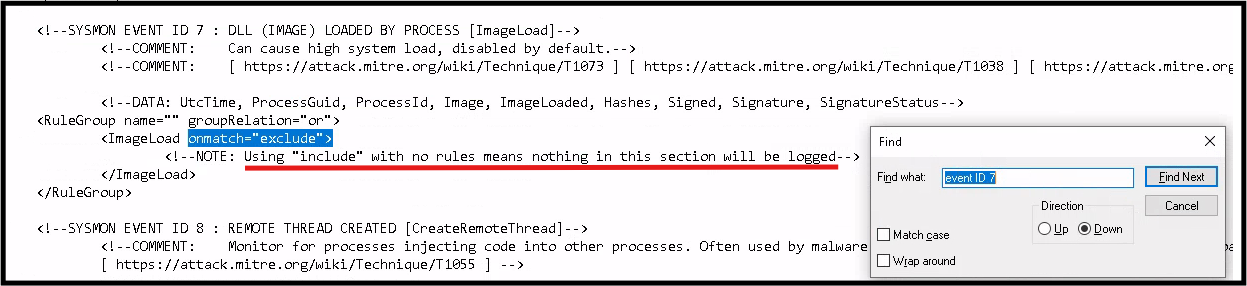
We are working with a config file from a repo posted at the bottom of this page. We open the XML config file and edit Event ID 7 changing ImageLoad onmatch from include to exclude. This works kind of like a white/black list respectively. Include is the more configurative option. If the include list is empty then nothing will be logged, at least for this event ID.
Substep 1.2
We are interested in Event ID 7 because this catches module load events and we want to catch a DLL Dynamic Link Library hijack. Only Microsoft operating systems are susceptible to DLL hijacks. Attackers will replace legitimate DLLs with an infected version which will be called upon by some application, launching the malicious code.
2. Updating Sysmon application with our modified configuration file, Detecting DLL Hijacking
Run the following command in PowerShell from the sysmon folder file path:
sysmon.exe -c sysmonconfig-export.xmlWe will know the update was successful with the following messages Configuration file validated. and Configuration updated.
Substep 2.1
Navigate to the Sysmon logs via Event Viewer->Application and Services -> Microsoft -> Windows -> Sysmon. You may be surprised as I was to find that the Windows list was quite long. Make sure to open the sysmon folder and chose the log file. Check it out, an Event 7!

Things to look for:
- Look for DLLs loaded from unexpected or non-standard locations (e.g., user directories, temp folders, or network shares).
- Be suspicious of DLLs loaded from the same directory as the executable rather than system directories.
- Check if the process loading the DLL is a legitimate application.
- Verify if the process path is correct and not a masquerading executable.
- Check if the DLL is unsigned when it should be signed.
- Look for mismatched signatures between the executable and the loaded DLL.
- Compare hashes with known-good version of the DLL.
- Look for discrepancies in hash values for supposedly standard system DLLs.
- Recent creation times for system DLLs could indicate replacement with malicious versions.
- Correlate with other events to understand the context of the DLL load.
- Check if the user context for the DLL load is appropriate for the application.
- Unusual patterns or frequencies of specific DLL loads might indicate malicious activity.
- Look for failed attempts to load DLLs, which might indicate an attacker's failed hijacking attempt.
- Pay extra attention to DLL loads by applications known to be vulnerable to DLL hijacking.
Substep 2.2
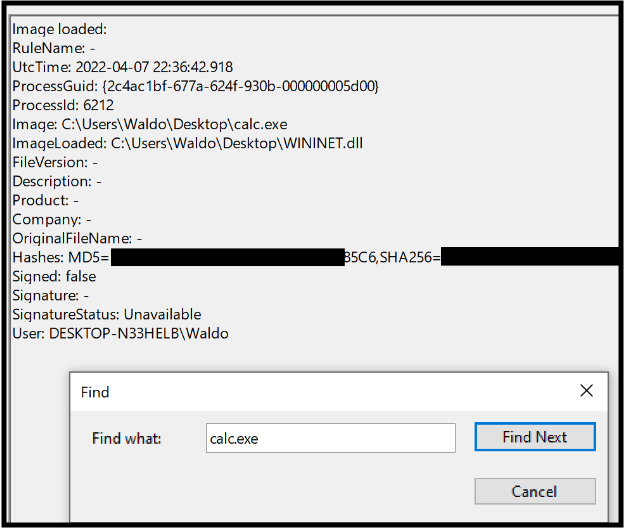
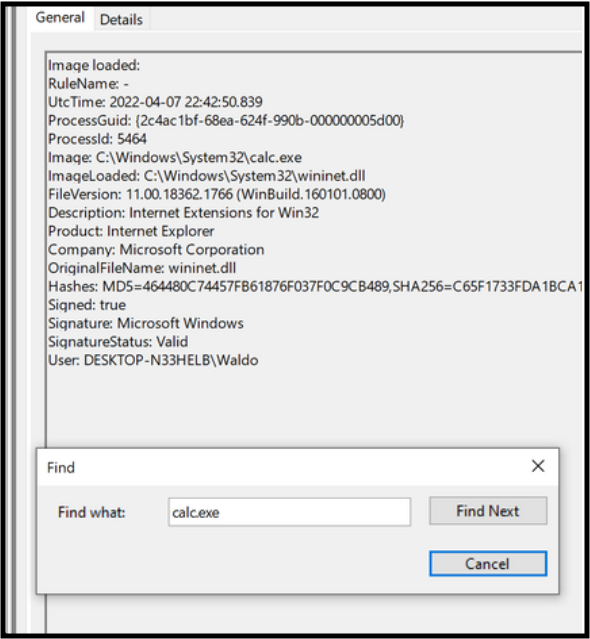
The next steps involve downloading a test DLL hijacking file from a GitHub repo and then replacing the Calc.exe WININET.dll with this fake, with the name changed. Both files need to be in the same folder. We used the desktop to keep it simple.
- We open the calculator and head back to event viewer, once again looking for Event#7s.
Indicators of Compromise (IoCs):
- Calc.exe should not be found in a writable directory, it should reside in System32.
- The DLL should not be loaded outside System32 by calc.exe.
- The signature being invalid is a huge IoC.
3. Detecting Unmanaged Powershell/C# Injection
From HTB, 'C# is considered a "managed" language, meaning it requires a backend runtime to execute its code. The Common Language Runtime (CLR) serves as this runtime environment. Managed code does not directly run as assembly; instead, it is compiled into a bytecode format that the runtime processes and executes. Consequently, a managed process relies on the CLR to execute C# code.'

Next we run some powershell commands, using PSInject project which will allow us to transition executable from unmanaged to managed. We do this to spoolsv.exe. We will need the process ID from our process hacker application. PSInject is a tool or technique used to inject PowerShell code into the memory of a running process. This is often used in penetration testing and red teaming to execute PowerShell scripts stealthily within the context of another process.

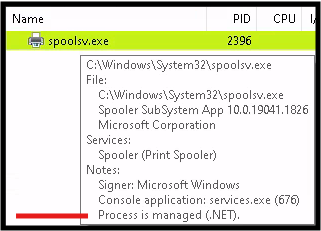
The process running the dll never did show up in sysmon. I tried sending some print jobs but no luck. I'm going to use powershell to calculate the hash of the dll located at this folder: C:\Windows\Microsoft.NET\Framework64\v4.0.30319.

4. Detecting Credential Dumping Attack via Mimikatz
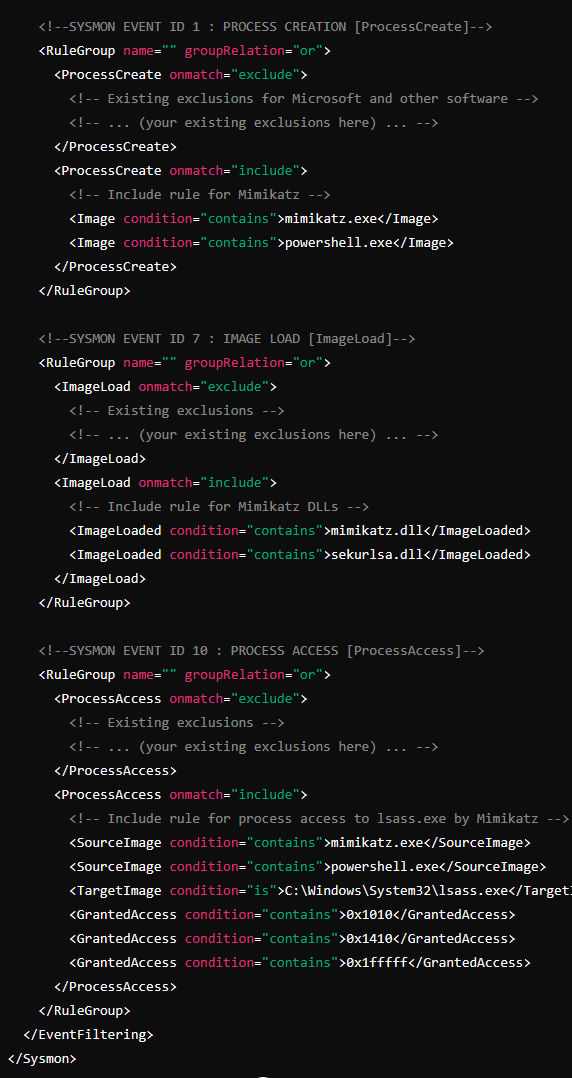
We change to the Mimikatz directory and execute. We will no longer be looking for Event ID 7s. Any guess what we will be using. Reference the bottom of this page! It took me about 10 minutes of frustration to remember to update the config file for this event ID.
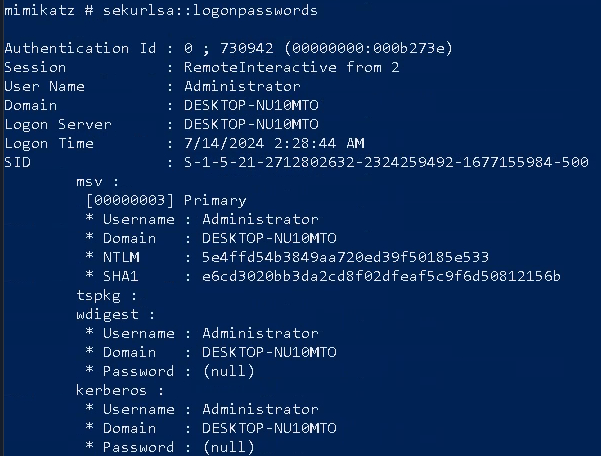
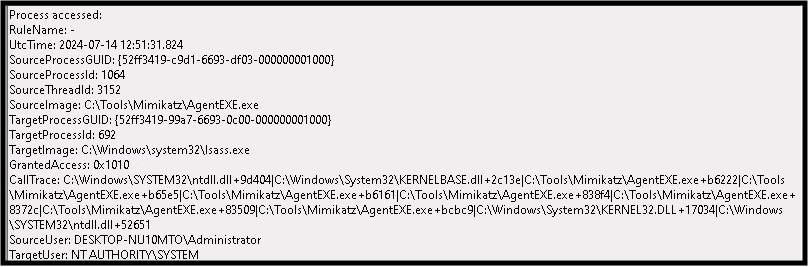
So this didn't work. I wasn't going to give up. With some help from AI we updated the sysmon config file further. Let's see if it works. We clear the event viewer logs once more and run mimikatz. I'm able to see me executing mimikatz, but not the dump, what gives?! Surely this means the config file is not set right. Either way we completed the challenge.
Conclusion
This challenge was very beneficial because I haven't touched Sysmon in awhile and I wasn't comfortable with it which is why I was sure to document it well. I've seen .dll EDR alerts in the SOC before, but now I have a deeper understanding of the dangers that exist. We learned a little about injections via PowerShell and got to play with Mimikatz. It was a good day!